
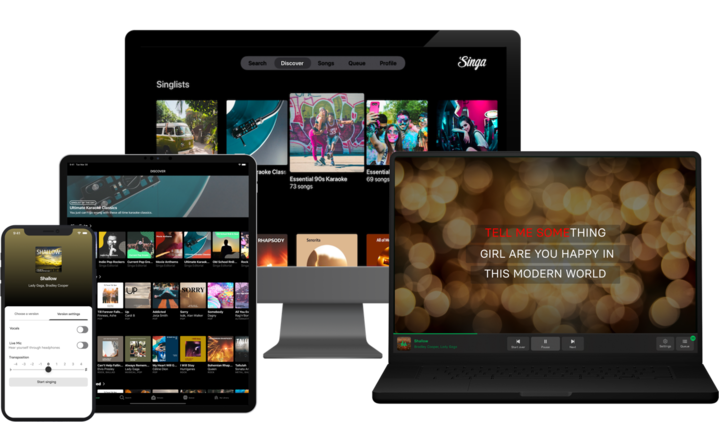
Good news: you do not need a karaoke machine to have a brilliant karaoke night at home. Your phone, laptop, or smart TV is already enough to get started, and Singa gives you 100,000+ songs across all of them. For however you prefer your karaoke, there are a number of different scenarios available: the karaoke novice, the occasional singer, the party performer, and the die-hard vocalist. While a karaoke machine may be a worthwhile investment, for those with limited space or budget, there are many options. Plus, a simple karaoke home set-up can be a great alternative to hitting the stage at your local karaoke bar.

To find the best fit for you, we’ve broken down some basic scenarios and have suggestions as to how best to run karaoke without a karaoke machine. Check out our options below:
- I’ve got no equipment, but I still want to sing right now
- I like to keep things chill some nights with family and friends
- I like to throw the odd karaoke party once in a while
- I’m a die-hard karaoke fan looking to totally outfit my space
I’ve got no equipment, but I still want to sing right now
Sometimes the urge to sing strikes and you just want to go. The good news, it's super easy to set up. Singa runs in any browser at singa.com or on the app, so your phone, tablet or laptop is your karaoke machine. Pick a song, adjust the pitch to your range, and there you go!

- Create a free account. You can navigate to singa.com with your computer, download the Singa app to your mobile device or tablet, or open Singa with your Smart TV.
- Select your favorite tracks from our growing catalogue of karaoke songs. Transpose the pitch and configure the playback to match your preferred volume and range.
- Press play and start singing! With Singa, you can enjoy singing without ads. Sing until your heart’s content with either the free account, which includes a select number of song plays per day, or upgrade to Singa Premium to unlock an even bigger and better catalog.
- Want lyrics on the big screen? Connect to your TV via AirPlay (from iPhone, iPad or Mac) or an HDMI cable for instant full-screen karaoke.
For more details, check out our full home karaoke setup guide for everything you need.
I like to keep things chill some nights with family and friends
If you are a homebody who prefers to do karaoke on their own turf with the occasional family member or friend, there are some steps you can take to get your hands on some simple products that will help facilitate those chill, low-key evenings at home. After all, karaoke is all about singing on your terms.
Skip the big-ticket machines and speaker hook-ups for now and start at the beginning: browse from some of the best high quality speaker and microphone sets on the market (and our personal favorites). These items can be purchased and stored easily and conveniently in your home. Look for something with Bluetooth connectivity and a built-in microphone input. The JBL PartyBox range is a great shout here: it pairs with Singa wirelessly, includes a wireless mic, and sounds genuinely great for a living room setup.
If you want to get the lyrics up on the TV too, AirPlay from your iPhone, iPad or Mac makes it completely wireless. Or just grab an HDMI cable and plug straight in.
If you’ve got friends who also love karaoke nights at home, consider pooling your money and chipping in together on an extra-fancy portable setup that can be rotated around your group. These types of models are still mostly lightweight and easy to transport and work.
I like to throw the odd karaoke party once in a while
We hear you: Karaoke is fun, but maybe it’s not worth investing in a proper system just yet. You like to host a party now and then, and your friends love to sing it up in your house, but do you really need a dedicated karaoke space right now?
If you’re still on the fence about karaoke equipment, consider some great rental options for your next party. There are plenty of local retailers in your area that specialize in renting out quality karaoke players and speakers – delivered and installed by professionals, and then collected once the fun is over. These are ideal for hosts with minimal space and limited budgets, but who don’t want to give up their musical traditions.

Or, if you’re thinking that it’s probably a good idea to at least have some low-cost, high-value karaoke products on hand at all times, for those very impromptu breakout party sessions! Selecting from a line of professional-grade microphones and speakers is great for party hosts who are still considering a major permanent in-house karaoke setup. If you've purchased the tools for a last-minute karaoke party, you'll always be prepared for whatever mood strikes. An easy solution is also getting a JBL party box, see our guide here.
Another great option for the occasional karaoke host is the Singa 2-Day Premium Pass that is perfect for parties! The 48-hour pass lets you sing at home using the Singa app on your computer, phone, tablet, Android TV, or Apple TV. Simply log on, purchase and get access to quality karaoke versions of the biggest and best songs! To help you shine, adjust the song pitch to a level that best suits your voice, or turn on guide vocals to help you work your way through unfamiliar tracks.
Best of all, you can launch the Singa karaoke player in a separate window or TV screen with the pop-out player and browse and add songs while your friends are at the mic. Singa's Party Mode queue feature is a game-changer: guests can add songs from their own phones so you never have to interrupt the singing to pick the next track. The party just keeps going.
I’m a die-hard karaoke fan looking to totally outfit my space
If you’ve got a love for karaoke and the above options just won’t do, consider amping up your space with a top-of-the-line setup. Depending on the size of the area you have to work with, there are a number of configurations available. But consider the following:
- Are you thinking about dedicating an entire room of the house to karaoke? Vacant storage rooms are great for turning drab into fab! First off, be prepared to devote some funds for excellent soundproofing, on top of the equipment.
- If you are constructing from the ground up (like a major section of an unfinished basement), get your building team to make the most of the space from day one, such as a small stage, if possible; and maybe a dedicated bar space with ample room for seating for when guests are watching and waiting their turn.
- Make sure that you’ve factored in all of the lighting and power supply elements so that you don’t blow a fuse: energy usage from speakers, lights, microphone hookups, and the karaoke player itself can add up, so make sure you’re prepared.

Now that you’ve got the space designed, you’ll want to invest in some quality karaoke equipment. Some basic products you’ll need for your at-home karaoke venue include loudspeakers, digital screens, microphones, iPads, cables, and mixers. For a full walkthrough, check out our home karaoke setup guide.

Once your room is set up, Singa gives you 100,000+ songs and something no karaoke machine can match: Singa Originals. These are actual master recordings from artists like Kylie Minogue, Cardi B, Linkin Park, and Roxette. Singing alongside the real studio track in a proper home setup? That is the karaoke experience at its best. Ready to sing? Start free at singa.com.
FAQ about home karaoke without a machine
Do I need a microphone to do karaoke at home?
No. You can sing using your phone's built-in microphone or through a TV speaker. A dedicated microphone improves sound quality but is not required to get started.
What is the best app for home karaoke without a machine?
Singa is the most complete option. It has 100,000+ songs, works on any device, supports AirPlay and HDMI for TV connection, and includes Singa Originals: real artist master recordings rather than soundalike covers.
Is Singa free to use at home?
Yes. The Singa free tier gives you three songs per day at no cost. Singa Premium is $9.99 per month or $89.99 per year. A 2-day pass for parties is $5.90.
Can I connect Singa to my TV without a machine?
Yes. Connect wirelessly via AirPlay if you have an iPhone, iPad or Mac, or use an HDMI cable from your device to the TV. Both options give you full-screen lyrics and audio.
How many songs does Singa have?
Singa has a rapidly growing song catalogue with over 100,000 karaoke songs, spanning pop, rock, K-pop, country, Latin, and more.
